First, let’s clarify what we mean by “long-tail keywords.” These are longer, more specific search phrases that people use when they’re closer to making a purchase or finding a very specific answer. In this post, we will learn about how to conduct long-tail keyword research to find these hidden gems.
Think of it this way: instead of searching for “coffee,” someone might search for “best coffee beans for French press under $20.” See the difference? That specificity is the key.
But here’s where it gets interesting: While individual long-tail keywords have lower search volume, collectively, they make up the majority of searches online. According to Ahrefs, 95% of all keywords get ten searches per month or less.

That means focusing on these seemingly small keywords can add up to significant traffic—especially if you’re just starting out.
The best part? Long-tail keywords are typically less competitive. Big brands often target broader terms, leaving an opening for smaller sites to rank for these more specific phrases.
Step 1: Unearthing Keyword Opportunities with Google Search Console
Google Search Console (GSC) is your free goldmine for finding keywords you already rank for—even if you’re not on page one. This is crucial because it reveals what Google already associates with your site.
Now, you might be thinking: “But I’m not ranking for anything yet!” That’s okay. Even a few impressions are enough to get started.
How to Find Long-Tail Keywords in Google Search Console
- Log in to Google Search Console: Head over to search.google.com and select your website.
- Navigate to “Performance”: In the left-hand menu, click on “Performance.”
- Set the Date Range: Adjust the date range to at least the past three months for a good sample size.
- Filter by Position: Click on the “Average Position” filter to see the queries you rank for.
- Identify Long-Tail Queries: Look for queries with three or more words. These are your potential long-tail keywords.
- Analyze Impressions and Clicks: Focus on keywords with a decent number of impressions but low clicks. This indicates an opportunity to improve your ranking and CTR.
Let me show you what I mean: Let’s say you have a blog about houseplants. You might find that you’re getting impressions for keywords like “how often to water snake plant” even if you’re not ranking on page one. Bingo! That’s a long-tail keyword to target.
Here is an example from my GSC data:
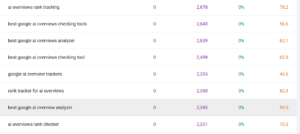
Action Tip: Create content specifically targeting these keywords. Optimize your title tag, meta description, and content with the exact phrase. Read our post on how to optimize old content pieces for maximum impact.
Step 2: Expanding Your Keyword Universe with AnswerThePublic
AnswerThePublic is a free tool that visualizes questions people ask around a specific keyword. It’s like peering into the minds of your potential audience.
How to Use AnswerThePublic for Long-Tail Keyword Research
- Head to AnswerThePublic: Go to answerthepublic.com.
- Enter Your Seed Keyword: Type in a broad keyword related to your niche. For example, “houseplants.”
- Explore the Visualizations: AnswerThePublic will generate a series of visualizations showing questions, prepositions, comparisons, and related keywords.
- Identify Long-Tail Questions: Focus on the “Questions” visualization. These are the exact questions people are typing into Google.
- Filter and Download: You can filter the results and download them as a CSV for further analysis.
Here’s the thing: AnswerThePublic reveals the specific pain points and information needs of your audience. For example, you might discover questions like “why are my houseplant leaves turning yellow” or “how to propagate snake plant in water.”
Action Tip: Create blog posts, videos, or infographics that directly answer these questions. Use the exact question as your H2 or H3 heading for featured snippet optimization.
Step 3: Mining Gold from Google Autocomplete and “People Also Ask”
Google Autocomplete (the suggestions that appear as you type in the search bar) and the “People Also Ask” (PAA) boxes are another free source of long-tail keyword ideas.
How to Leverage Google Autocomplete and PAA
- Start Typing: Begin typing your seed keyword into Google. Pay attention to the autocomplete suggestions.
- Use Modifiers: Add modifiers like “how,” “what,” “where,” “why,” “best,” or “cheap” to uncover more specific suggestions.
- Explore “People Also Ask”: After you perform a search, look for the “People Also Ask” box. These are related questions that Google thinks are relevant to your search.
- Click to Expand: Click on each question in the PAA box to reveal more related questions. This is an endless rabbit hole of keyword ideas.
And this is where most people stop — but you shouldn’t: The key is to analyze the intent behind these suggestions and questions. What problem are people trying to solve? What information are they seeking?

Action Tip: Use these autocomplete suggestions and PAA questions to create a comprehensive FAQ section on your website or to generate new blog post ideas.
Real-World Example: Finding Low-Competition Keywords in the “Coffee Brewing” Niche
Let’s make this tangible with a real-world example. Imagine you’re starting a blog about coffee brewing.
First, you plug “coffee brewing” into AnswerThePublic. You discover questions like:
- “coffee brewing with almond milk”
- “coffee brewing without a filter”
- “coffee brewing with a sock”
Then, you head to Google and start typing “coffee brewing…”
Autocomplete suggests:
- “coffee brewing at home”
- “coffee brewing methods”
- “coffee brewing for beginners”
Finally, you check the “People Also Ask” box and find:
- “What is the best way to brew coffee at home?”
- “How do you make good coffee with a drip machine?”
- “What is the difference between cold brew and iced coffee?”
Now, you might be thinking: Those are some pretty good keywords! Using just these free tools, you’ve uncovered a wealth of long-tail keyword ideas related to coffee brewing. You can now create content specifically addressing these questions and topics.
FAQ: Your Long-Tail Keyword Research Questions Answered
Here are some common questions about long-tail keyword research:
Q: How do I find long-tail keywords for free?
A: You can find long-tail keywords for free using tools like Google Search Console, AnswerThePublic, and Google Autocomplete/People Also Ask. These tools help you uncover questions, phrases, and topics that people are searching for related to your niche.
Q: What are the best free tools for long-tail keyword research?
A: The best free tools for keyword research include Google Search Console (for finding keywords you already rank for), AnswerThePublic (for generating question-based keywords), and Google Autocomplete/People Also Ask (for uncovering real-time search suggestions).
Q: How can I use Google Search Console for keyword research?
A: Use Google Search Console to identify keywords you’re already getting impressions for, even if you’re not ranking on page one. Focus on long-tail queries with high impressions but low clicks, and then optimize your content to improve your ranking and click-through rate.
Q: How do I find low competition keywords?
A: Look for long-tail keywords with specific search intent. These keywords are often less competitive than broad, generic terms. Use tools like AnswerThePublic and Google Autocomplete to find niche questions and phrases that aren’t heavily targeted by larger websites.
Q: What is a good keyword difficulty score?
A: While free tools don’t typically provide a keyword difficulty score, you can gauge competition by manually searching for the keyword on Google. Analyze the top-ranking results. If you see mostly large, established websites, the keyword is likely more competitive. Look for keywords where smaller blogs or niche websites are ranking.
Q: How important are long-tail keywords for SEO?
A: Long-tail keywords are crucial for SEO, especially for new websites. They allow you to target specific niches, attract highly qualified traffic, and rank more easily than with broad keywords. Over time, ranking for long-tail keywords can build your site’s authority and help you rank for more competitive terms.
Conclusion: Unlock Your Blog’s Potential with Smart Keyword Research
The biggest takeaway here? You don’t need expensive tools to find keywords that can drive traffic to your blog. With a little elbow grease and these free resources, you can unearth a treasure trove of long-tail opportunities.
Bottom line: Consistently applying this workflow will surface those hidden gem keywords that your competitors are missing. It’s about understanding search intent, providing valuable content, and optimizing for those specific phrases.
Now go forth and put these free tools to work! Start with Google Search Console to see what you’re already ranking for, then expand your horizons with AnswerThePublic and Google Autocomplete. Then consider reading a blog post about keyword research to learn more about it.