We Deleted 47 Blog Posts and Organic Traffic Grew 32% — Here’s the Exact Process We Used

Imagine you’ve poured your heart and soul into dozens of blog posts, but your organic traffic is stuck in neutral. Frustrating, right? Leaving that content untouched is like letting weeds choke the life out of your thriving plants. It drags down your entire site.
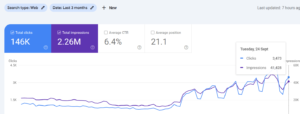
But what if I told you the solution wasn’t more content, but less? This post reveals the exact content pruning strategy we used to slash 47 underperforming blog posts and watch organic traffic jump 32%.
Get ready to learn how to audit, decide, and execute a content pruning strategy that Google will reward.
Table of Contents
Content pruning is the process of removing or improving low-quality, outdated, or irrelevant content from your website. Think of it as decluttering your digital space to improve overall site health and SEO performance.
Why is this important? Google prioritizes websites that offer a high-quality user experience. A site filled with thin content, keyword cannibalization, and outdated information signals the opposite.
Bottom line: A leaner, more focused site is easier for Google to crawl, index, and understand, ultimately boosting your rankings.
You can’t prune effectively without knowing what you have. A content audit is the first crucial step. This involves taking inventory of all your existing blog posts and pages.
Here’s the thing: Don’t just look at surface-level metrics like page views. Dig deeper.
Tools like Google Analytics, Google Search Console, and Ahrefs can provide this data.
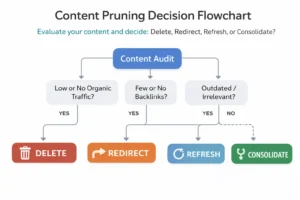
With your audit complete, it’s time to make some tough decisions. Here’s a framework for categorizing your content:
Now, you might be thinking: Is deleting content really a good idea?
Here’s the part nobody talks about: Yes, if it’s truly hurting your site. Thin content drags down your overall authority. Cut the dead weight.
Delete posts that meet all of these criteria:
Caution: Before deleting, double-check that the page isn’t receiving traffic from other sources (social media, email, etc.).
Use 301 redirects when:
Here’s the thing: Redirect to the most relevant page. Don’t just redirect everything to your homepage.
Revitalize content that:
Refresh by:
According to a HubSpot study, refreshing old blog posts can increase traffic by over 106%.
Consolidate posts when:
This involves merging the best elements of each post into one and redirecting the old URLs to the new, consolidated page.
Now for the execution. This is where the rubber meets the road.
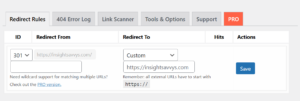
Let me show you what I mean:
In our case, we used a WordPress plugin called “301 Redirects – Redirect Manager” to manage our 301 redirects. It’s simple and effective.
Content pruning isn’t a one-time event. It’s an ongoing process. Monitor your results and make adjustments as needed.
Track these metrics:
Use the data to refine your content strategy and identify new opportunities for optimization.
Q: What is content pruning and why is it important?
A: Content pruning is the process of removing or improving low-quality, outdated content on your website. It’s important because it improves crawl budget, reduces keyword cannibalization, enhances user experience, and increases domain authority, leading to better SEO performance.
Q: How do I identify content that needs to be pruned?
A: Identify content for pruning by auditing key metrics like organic traffic, bounce rate, time on page, conversions, and backlinks. Focus on pages with minimal traffic, low engagement, and outdated information.
Q: What are the different options for content pruning (delete, redirect, refresh)?
A: The main options are: delete (for low-value content), redirect (for outdated content with relevant replacements), and refresh (for content that can be updated and improved).
Q: How often should I prune my website content?
A: Aim to conduct a content audit and pruning exercise at least once or twice per year, or more frequently if you publish a large volume of content.
Q: Will deleting content hurt my SEO?
A: Deleting low-quality content can actually improve your SEO by focusing Google’s crawl budget on your best pages and improving your overall site quality score.
Q: What tools can I use to audit and prune my content?
A: Tools like Google Analytics, Google Search Console, Ahrefs, and Screaming Frog can help you audit your content. WordPress plugins like “Redirection” can assist with implementing 301 redirects.
Content pruning isn’t just about deleting old posts. It’s about strategically shaping your website into a high-performing asset. By focusing on quality over quantity, you’re signaling to Google (and your audience) that you’re a source of valuable, relevant information.
Ready to take control of your content and see a real boost in organic traffic? Start with a content audit and implement the pruning strategy outlined in this post. Then, drop a comment below and let me know your results!